

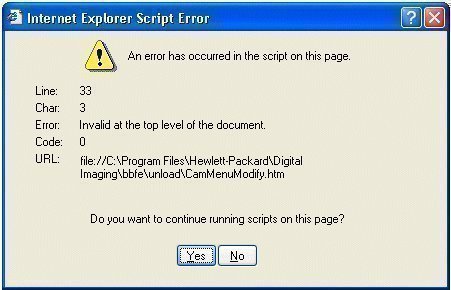
An Internet Explorer Script Error occurs when a web browser (Internet Explorer) experiences difficulties running a client-side script from a website.
These scripts may be in JavaScript, JScript, or VisualBasic script.
In most cases, these errors are a result of something that the web developer who implemented the script on the web page did and nothing can be done to resolve them.
Disabling Internet Explorer Script Errors
Internet Explorer Script Errors are nuisances. In order to stop seeing uncontrollable error messages, disable them by doing the following:
- Open Internet Explorer
- Open the Tools menu
- Select the Internet Options menu item
- Open the Advanced tab
- Check the box next to “Disable script debugging”
- Remove the check next to “Display a notification about every script error”
- Click the OK button
Repairable Causes of Internet Explorer Script Errors
In some cases, the error can be changed or repaired on the PC. These cases include:
- Java Applets, Active scripting, ActiveX controls are being blocked. This blocking can be due to the Internet Explorer configuration, an anti-virus program, a PC firewall, or a network firewall.
- Anti-virus software is configured to scan Downloaded Program Files or Temporary Internet Files folders.
- The relevant scripting engine on the computer is corrupt or outdated.
- Internet-related folders on the computer are corrupt.
- The video card drivers are corrupt or outdated.
- DirectX is corrupt or outdated on the computer.
For more information on repairing these Internet Explorer Script Errors, refer to How to Troubleshoot Script Errors in Internet Explorer.

Mahi
When i start a login show java script eror pls help me?
Jason
I had a similar problem with the installation of Microsoft Office 365. I already had the fix “completed” on my end, before reading this. Then I deleted the cookies, history, and cache and everything started working like normal. I would suggest deleting these things.
bucks
I have this same problem and the fix listed does not work. It happens only with my Facebook account on several computers(laptop, desktop and work). At home, my wife has no problem with her Facebook account (laptop and desktop)…. HELP.
roseli.soares
porque que da erro acada vez que vou mahdar escript
españolito
roseli.soares are you reterded?
don barajas
WHAT IS THIS HUMUNGUS ORANGE ARROW POINTING DOWNWARD SUPPOSE TO MEAN ? FILE VIEWER ? DOWNLOAD ?? DON B.
don barajas
NONE OF THE ABOVE FIXES WORK ON MY PC. IVE ASKED FREINDS AND FORUMS AND THEY ALL SAY USE THE TOOLS OPTION. DISABLE SCRIPT DEBUGGING AND REMOVE THE CHECK IN NOTIFICATION OF SCRIPT ERRORS. ” DOES NOT WORK “…HOW COME NO ONE ARGUES WITH ROGER THE FIRST REPLY ABOVE ??? COME ON ,MAN …SOMEBODY’S GOT TO KNOW. DON B.
Jack DeBrual
To eliminate the script error messages, download google earth. It works. Don’t ask me how but it does.
sadig
Internet Exporer Script Errors
there are not realy answer of the problem what we have
how i can not find any answer of my question ??
are there nobody to find the right solution??
best
Sadig
Roger
Why do all you blokes say the same thing… The Internet TOOLS solution simply does not work! I am a paid PCTOOLS customer, I am a paid ZoneAlarm Customer, and I am a paid TUNEUP custome, and I use Glary as well as AdBlock addons for FIREFOX..
Nothing works, and I think you’re all frauds! ANYONE WANT TO ARGUE?
Roger
Mohamed ali
For me , i had same case and nothing of these steps worked for me too
until , i read about updating the IE Browser ( I had IE 6 , and i use Firefox so it wasn’t important for me to do this ) so i update my IE to IE 8 , and the problem is gone , and everything is working fine now
Hope this may help