

Excessive heat damages electronics. Monitoring CPU and other computer components’ temperature help them run properly. To make the most of monitoring software, users must ensure that ACPI functionality is enabled in their motherboard BIOS.
Why CPU Temperature is so Important
When the first affordable PCs were offered to the general public in the early 80’s, system engineers and designers took into consideration the heat that system components emitted and ensured that their case and cooling designs handled the appropriate amount of heat so system damage or instability was rarely an issue. These PCs were not very configurable and the user could not easily modify or customize them, except for memory limits and number of floppy storage devices. Most peripherals were external, so they did not really add heat issues to the base system and those that were internal were low power and low bandwidth technologies. This was acceptable to the public at the time, since not many people felt the need to modify their PCs.
In the late 90’s, the temperature bubble burst. Heat was increasing by leaps and bounds in newer systems that were far more complex than their predecessors.
Semiconductor Companies Producing Sensor Chips
Nearly complete sensing product information, including documentation for APIs and other software interactions and data sheets, are available on vendor web sites. The most prominent players in the sensor market are:
Polling Sensor Circuits to Display Environment Data
People normally use their system’s BIOS configuration menus or install monitoring software. Developers develop software using APIs that interact with system BIOS or the various system buses on the machine. Sensor controls are almost always connected to the computer’s IDE bus or SMBus infrastructures and can be accessed with the standard APIs for those buses.
Overclocking and Overvolting
Overclocking is the process of turning up the processor clock or multiplier value of a processor unit on the motherboard in order to get the highest possible clock and multiplier value without compromising system stability. Modern processors are often multiplier locked, preventing a user from just changing the bus multiplier and introducing negligible additional heat to the system. Only the actual processor clock value can be changed on these CPUs, generally having a wider effect on system heat and stability.
Increasing the voltage values (overvolting) allows the processor to handle its logic gates more reliably. A significant side effect of overvolting is increased heat emission.
Overclocking and overvolting systems can have negative effects on the system’s life span, so users should be sure that they know what they are doing when they attempt them.
First Generation Monitoring Solutions: Monitoring Temperature in System Bios
The first generation of CPU temperature monitoring software packages merely displayed the CPU temperature value. No alarms, events, or actions could be defined, it was merely a display only technology. If action was required the user would have to notice that the temperature was at a critical state and do something about it. If the user was not watching, the system could easily overheat and get damaged.
Unfortunately, users are not always at the console all day looking at temperature values, so this was only useful during diagnostics and testing periods when technicians knew there was a likelihood for temperature issues. It did help significantly with testing and burn-in periods, but beyond this, it was mostly just a data point a user might poll for a peace of mind.
Second Generation Monitoring Solutions: Sensor Circuits for Monitoring Temperature
Sensor circuits of the second generation monitoring solutions have the ability to regulate and control environmental conditions automatically, so these are adequate enough to keep systems stable when heat is an issue.
Third Generation Monitoring Solutions: Hardware that Allows Software to Monitor and Modify State
The newest generation of CPU temperature monitoring software interacts directly with motherboard sensor and fan control circuits to attempt to control and adjust the system’s environmental conditions. Many motherboard manufacturers offer this software for free (Abit’s microguru and Asus’ PC Probe) because they are specifically targeting the custom and high performance system builders. In fact, Abit has an excellent LCD panel that is installed in a 5.25″ 1/2 height drive bay that allows the user to monitor and even control his/her processor and environmental settings with a simple button interface!
Third Party Monitoring Software
Not all motherboard vendors provide software to display and control system environmental resources. Even when they do, the software is sometimes functional but poorly developed, clunky, unreliable, or may not play well with other installed system software. Aside from this, not all vendors use the same sensor solutions on their boards or between multiple boards they produce. Also, many motherboard vendors do not put enough fan controller connections in the system, so the user may want to install a fan controller card or additional environmental control components that are outside of the motherboard’s control. To cope with this, many developers have been providing software solutions to give users an integrated control solution.
Most monitoring software automatically detect and configure the proper sensors for the motherboard. Some have a drop down list of motherboards to select from and others simply have a list of motherboard sensors to select from. If the user has questions about the motherboard sensors that his/her motherboard has, he/she should check the motherboard or system documentation or contact the system vendor.
Free Windows CPU Temperature Monitoring Software
Second Generation Monitors
- Motherboard Monitor is an excellent program that handles a wide variety of motherboards and sensors, but is no longer in development. Since the package will never be released open-source, it will be less usable as time goes on.
- If the user has an Intel motherboard or motherboard based on an Intel Chipset, he/she can utilize the Intel Active Monitor.
Third Generation Monitors
Most third generation monitor packages are only available through motherboard manufacturers at this point, but a few third party packages re available for download.
- SpeedFan is a freeware program that monitors voltages, fan speeds, and temperatures in computers with hardware monitor circuits. What really sets SpeedFan apart is that it can change fan speeds (if the computer’s hardware supports it) according to the temperatures measured inside the PC. SpeedFan makes it possible for PCs to run very quietly and safely.
- Hmonitor is a cross breed between second and third generation monitoring software. The professional version of the Hmonitor software can preempt a change in CPU frequency or fan speed based on an event.
Free Linux CPU Temperature Monitoring Software
Linux has had a few effective temperature monitoring packages out there for the last few years. It should be easy to install and configure such software programs for users who are well-versed with the Linux operating system. Most of these packages require a recent release of the Linux kernel.
Second Generation Monitors
- lm-sensors has the capability to detect, display, and configure monitoring parameters for Linux systems.
- If a user wants to monitor many system resources at a glance or control how the display of that data is provided, he/she could use GKrellM. GKrellM is just a visual framework for the environmental control functions of Linux, so “lm-sensors” had to have been previously installed to get it fully functional.
- KSim is a package that combines the sensing capabilities of “lm-sensors” with the visual controls of “GKrellM”. KSim is a plugin based system that lets users monitor and display only those components they consider important.
Third Generation Monitors
An integrated third generation application for system sensor monitoring and control has not been released to the public as yet, but there are some alternatives if a user has the adequate motivation, knowledge, and links with the Linux developer community.
- The Sourceforge ACPI Project is an ACPI framework and utilities set for Linux that monitors and controls system environmental resources.
Free FreeBSD CPU Temperature Monitoring Software
FreeBSD has an application in its ports system that allows users to monitor their onboard sensors.
Second Generation Monitors
- lmmon is an ncurses based application that samples the sensor status every second and displays it on the screen. The software can be configured to output simple text, system management, and alerting systems like the NET-SNMP package or other external programs can utilize it.
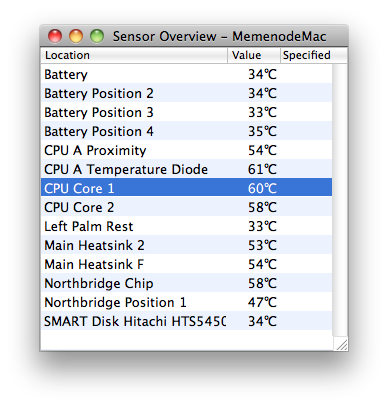
Apple OSX CPU Temperature Monitoring Software
Apple Computer has always led the industry in providing low level controls and details on hardware that most manufacturers would consider unnecessary or even foolhardy. Apple has continued this practice by providing access to more hardware monitoring sensors than other comparable systems provide. So far, all software releases for monitoring on OSX are second generation solutions.
Second Generation Monitors
- If concerned about temperature sensors in the OSX system, the Temperature Monitor is a freeware application that monitors and displays all temperature related systems on the computer. In order to monitor and display other sensor types, purchase the full version of the Hardware Monitor software.
Modern users want to control and customize their systems to a greater degree than ever before. Monitoring a system’s sensor resources is critical for helping make what was previously a tedious, time consuming, and technically challenging task possible for the everyday user.
Bevan
HOW DO YOU NO IF ITS TOO HOT OR NOT, PLEASE ANSWER BECAUSE I NEED TO NO TODAY PREFERABLY
Robert Hutt
HELLO IM A TEACHER AND NO ALOT ABOUT COMPUTERS, YOU NO IF THE CPU CENTRAL PROCESSING UNIT IS TOO HOT BECAUSE THERES A SETTING ON THE PROGRAM THAT CAN COOL DOWN THE CPU. JUST TRY FIND IT IF YOU DONT LET ME NO.
Robert Anonymous
All you idiots can’t spell know correctly. I doubt Robert Huff is a teacher if he spells know like the opposite of yes.
majorfunding
HIGH BEVAN, DID THAT TEACHER LEARN YOU GOOD ENUF ABOUT ALL THE STUFF U NEEDED TO NO?
jimmy hudgens
i had a program that told me what the tempature of my desk top do you no what it was or how to get it
Pranav
Can you all mail me the code(program) to find cpu temperature in windows environment….
gobal
HI,
How can we get the base address for hardware monitoring(i.e temp, volt, speeed)??? can i get it from bios or is there any software for it???
muhammed sekertekin
Does this work for the new AMD Spider platform ?
Bob
The article talks about lm-sensors and that is the only Linux temp monitor I know of. You can get it to run in a small window with one of the gui interfaces, but that is not the solution. If your machine is shutting down you need to find the cause. Celeron chips do not run hot, so examine what is the real issue. Is the system being cooled properly? Did any of the fans quit? Is the machine full of dust that bocks air intake or exhaust? (I have seen some laptops and desktops with so much dust it’s a wonder they worked at all.). Maybe something else is amiss. Run some of the systems tests and find out the real prob.
Gary Morris
I’ve got a Linux system, and have been having trouble with the temperature shutting down the machine. There is NO warning, it just stops and shuts down, so I lose any work I’ve done. All I want to do is write a small program (or script if possible) to monitor the CPU/Motherboard temperature so when it is getting hot I can let it rest (and NOT lose any work). It has an Intel Celeron 550 running at 2MHz, and if I start doing a lot of things at once, it just stops cold (well, really hot, but you know what I mean). I’m not sure what software would give me that temperature, but if I just knew THAT I could write something to warn me. If you can help, thanks.
vel
Any softwares for measure the system heat(temperature) and system chipset!!
wrongdoer
I tried Everest to get the CPU temp on my Windows Vista machine, and it did not show the CPU temp. Then I tried an open source app from Sourceforge, and it didn’t show the CPU temp either. I then tried Speedfan and !Voila! CPU temp, and GPU (graphics processing unit) temp. I fully endorse Speedfan as a high quality solution, thank you. *bows*
rocky
You have any leatest mother board varson