

Deleting a Microsoft Exchange Server mail box is a relatively simple five step process. However, it is important to note that the mailbox will remain connected for thirty days after deletion. This is called the “mailbox retention period,” during which users can reconnect their mailbox if needed.
Deleting a mailbox will not permanently remove it from the server’s database. It will only mark it for future deletion. Once the mailbox retention period expires, the mailbox will be permanently deleted from the database. Someone who does not wish to wait for the mailbox retention period to end can permanently delete the mailbox by selecting the “purge” option.
How to Delete an Exchange Server Mail Box
- In a Microsoft Exchange Server, right click the desired user in the Active Directory of Users and Computers section of Exchange Server.
- Next, click Exchange Tasks. This will prompt a wizard to appear and direct the user thorough the following steps.
- Once the Exchange Tasks Wizard appears on the monitor, a welcome page will appear. Click the Next button.
- Press Delete Mailbox.
- Finally, click Next, Next, then Finish. During these steps, look over the information presented to make sure that everything is accurate and to verify that the mailbox should be deleted. If the user no longer wishes to delete the mailbox, he/she can always recover it.
How to Recover an Exchange Server Mail Box
Anyone that has regrets about deleting a mailbox can always recover it, provided that the server’s mailbox retention period has not expired for that particular box. In order to recover a deleted mailbox, please follow the steps below:
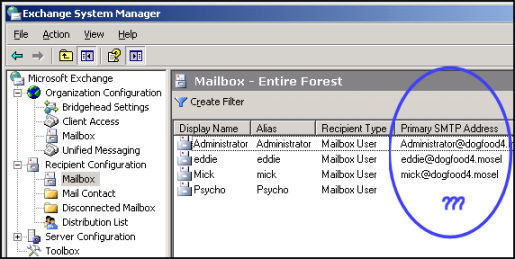
- Go to the Exchange System Manager and locate the mailbox store. Select the deleted mailbox to be recovered.
- Look under the mailbox store and click the mailboxes object.
- Right click the mailboxes object and select the Cleanup Agent.
- Last, right click the deleted mailbox and select Reconnect. When a dialog box appears, select the appropriate user and click OK.

Follow Us!